Birds nest live streaming
At the beginning of June, I heard hard flaps right beside my open window. First impression was that a hawk caught a pigeon on the roof and is eating it (I had that experience last year).
Then during the weekend I saw a pigeon flying into the green ivy on the wall between neightbour’s and mine windows. I thought it could be a nest there. And next Monday I decided to hack a nest streaming project.
GoPro on a stick
Consulted with a LLM, I decided not to proceed with raspberry pi and different pi-cameras, but use my GoPro, which runs GoPro Labs. Starting with a scouting, I’ve managed to find a pigeon sitting on a nest just by using GoPro on a stick and bending out of the open window. Next I collected verbal agreement from my neighbours, that they are ok with me pointing camera close to their window. And started the development.
I was using oh-my-claudecode aka OMC for some of the projects already,
so there was no reason not to use it here too. GoPro can stream live to a custom rtmp:// URL. The first design
was to run a MediaMTX media server in k8s, stream to it from GoPro and put a static web page with WebRTC/HLS
video player, sourcing from it.
After some test runs with Quick app (GoPro original mobile app), I’ve made a QR code that automates GoPro: starts live stream to pre-configured RTMP server, using pre-configured WiFi settings, keeps the stream for 1hr, then stops it, waits 2 seconds, and repeats the automation.
I decided to show that QR code (it does not contain streaming url and wifi info) on https://birds.aleksandr.vin when the stream is offline, so I can point camera to it and start live stream.
It’s recommended to remove battery from the camera when streaming for long time. I’ve played with streaming bitrate settings but didn’t come to the point of configuring a boot-script automation, so that camera can kick live streaming after power failure (I learned about that a day later).
Another problem was the radio signal between camera and home router: it sits on the ground floor in the center of the house, and camera is on the 1st floor on the wall outside of the window. Signal was very unstable and was lost too often, so I brought a WiFi bridge and put it close to the window.
Finally I started the live streaming with a QR code, then bolted a gopro-on-a-stick to the wall while live streaming. The pigeon flew away: it appeared to be very close to the nest, around 20-30 cm. There were one egg visible in the nest.
Whole rigging was a real-life PoC.
Recordings
The bird came back in an hour. I was very glad that she did. I shared the link with friends. When the camera lost the wifi signal and was not picking it up (till the end of the streaming hour), they asked if it is over, and if I am recording it to review later.
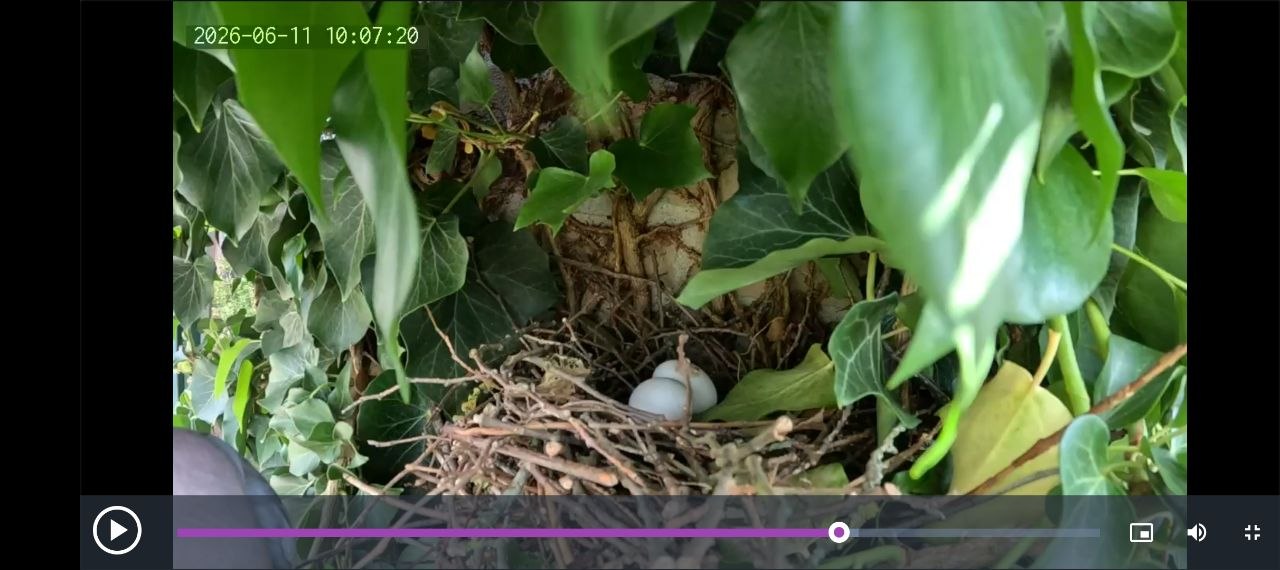
So next day I added automated recordings of 10 min chunks, which were uploaded to backblaze bucket and were accessible from a generated list on html page. And in the morning, while taking a train, I reviewed them and found a second egg become visible in the nest!
More networking
The camera was dropping the stream. It could be because the wifi bridge was struggling to keep the radio between camera and home router. I’ve relocated a wired wifi repeater on the 2nd floor to be just over the bridge (which was on 1st floor). Now the route was:
GoPro )))((( wifi bridge )))((( wifi repeater <===> home router
It became a bit more stable since then.
Analyzer + telegram
When stream was live, it was recorded by a special pod and stored in bucket. I kept an iPad by my monitor, where the stream was played. But I wanted to get notified on interesting events, as most of the time the pigeon sat without movement. Next mod was an analyzer pod with some OpenCV computations at 1 fps. You can select region of interest aka ROI for the bird movements and presence and a separate one for eggs. Then a 5 second span was analyzed for meaningful movement of edges. That produced a ‘movement’ event. Bird’s ‘present’ and ‘gone’ events were produced by presence of edges in the ROI. Events were published into a new telegram group and to OTEL.
It appeared more fun to see when analyzer was emitting events, as most of the time they were just noise.
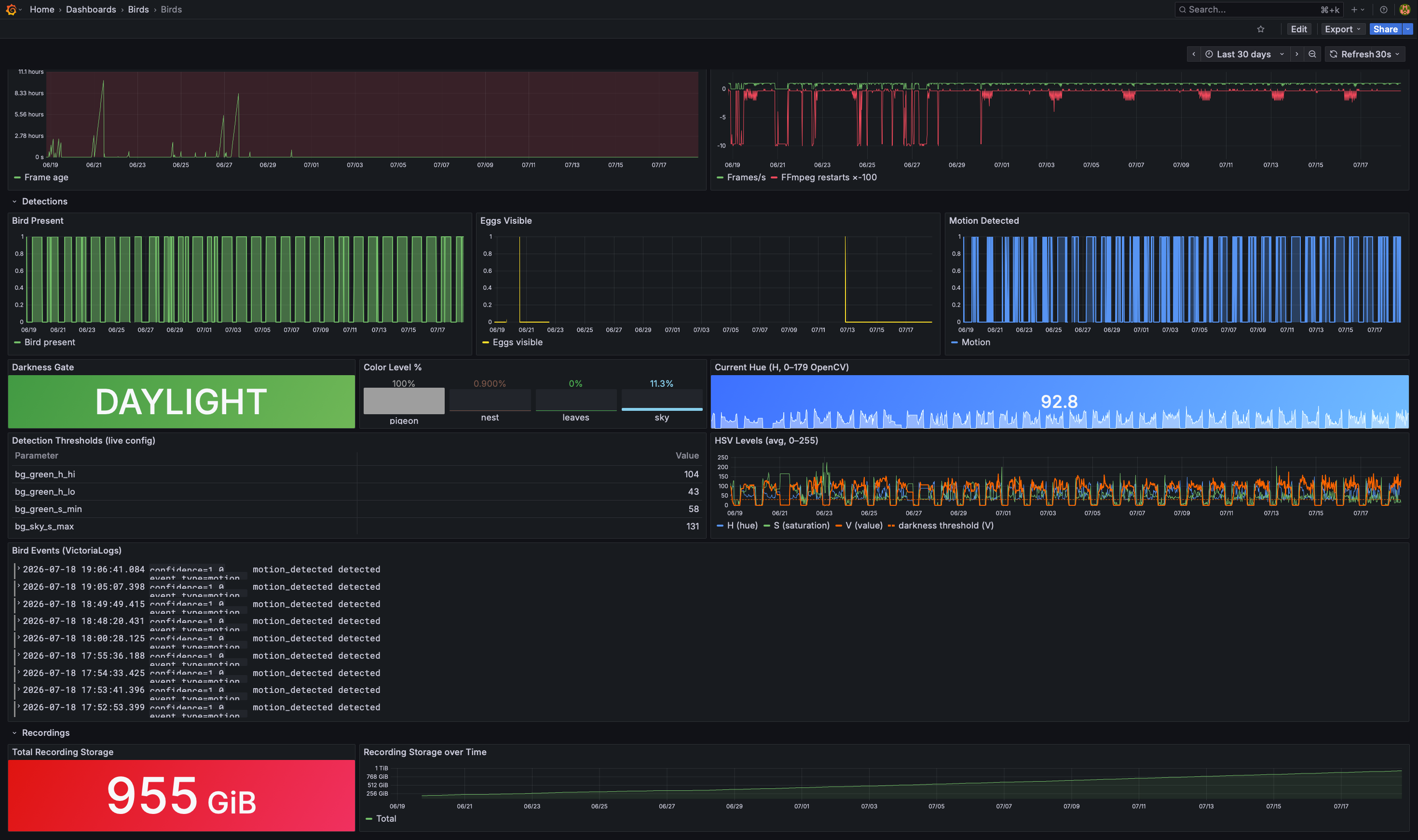
Later I switched to the color-based detection: bird is detected by grey volume, while green, brown (nest) and blue sky sparks were cut off. It improved detection a lot. Later I added a darkness gate: so detections are paused if the amount of color on the frame is too small. And a chain logic: eggs are not detected if bird is present and movement is not checked if bird is not present.
Grafana
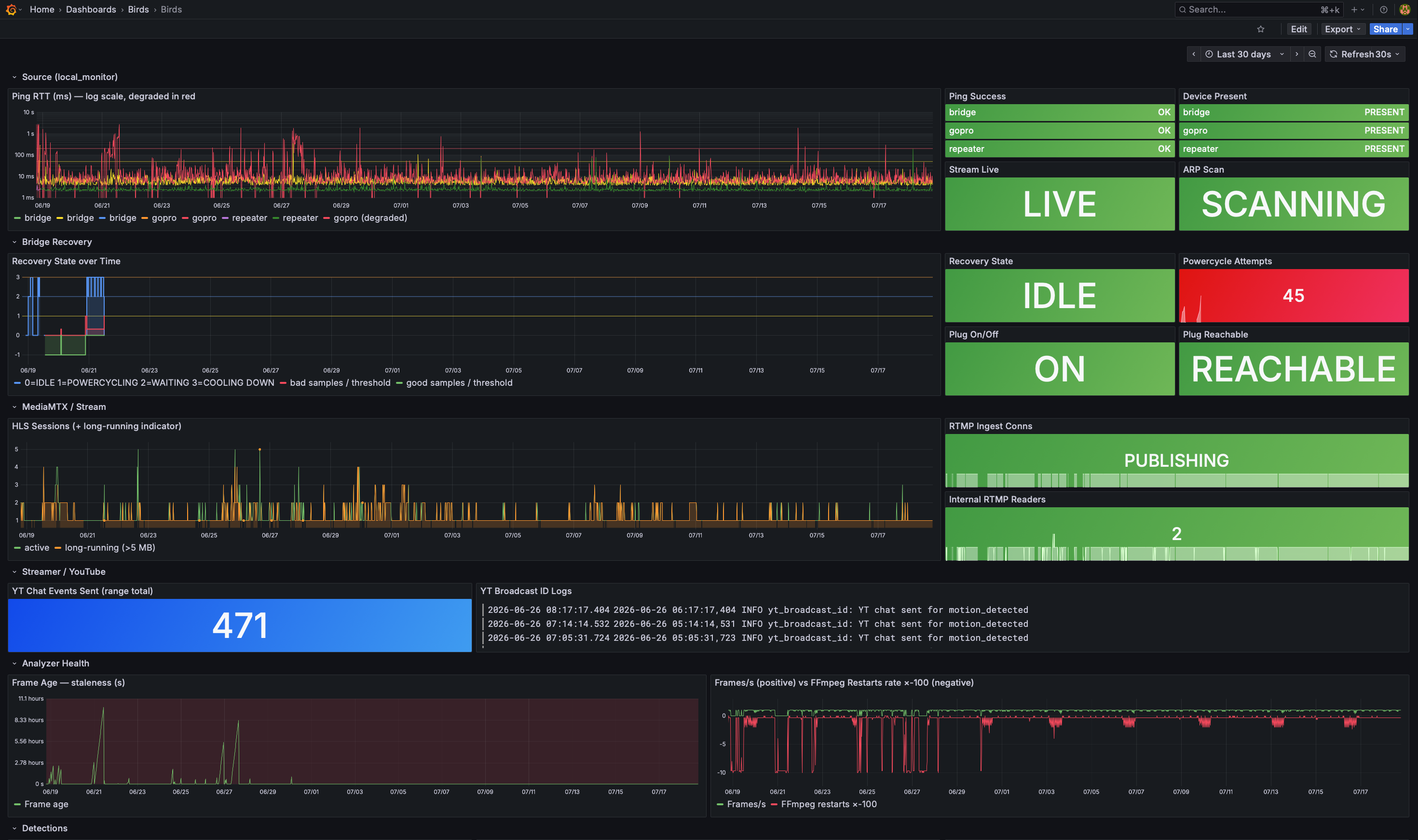
Next was building of Grafana dashboard. I’ve used their MCP server to give claude code (or codex) access to my Grafana, and got a pretty decent dashboard (after my review iterations).
Local monitoring
At some point I decided to rig a poor-man monitoring of the network devices: ARP pings and ICMP pings to the camera, bridge, repeater and stream status. Added a systemd service on home raspberry pi, which pinged all devices and published OTEL metrics as status and RTT to device.
Youtube live
HTML 5 video player was probably too simple to handle the fragile video stream, it was stuck sometime and not
restarting the reconnected video stream. I decided to try re-streaming my stream to youtube. Added another pod,
which used ffmpeg to copy the stream as-is.
This is one of the recorded live streams of that time (7h long): https://www.youtube.com/live/mHFozIH_e4A.
Recovery attempts
Somewhere around that time I saw a pattern: at some point, during a day, camera disconnects, and at the end of stream hour it will appear back but with 10-100x longer RTTs, like it is struggling with something. At this point it can run for full hour with such long RTTs, but if you turn off the bridge and turn it on in 5 seconds, camera got all fixed and is live and fast again. So I put the bridge into a smart plug and tried turning it off and on again via Philips Hue, based on the telemetry from local monitoring, gating attempts – you can see the attemps on screenshot with grafana on Bridge Recovery panel.
More Youtube fackery
While playing with youtube, I registered an app to be able to add comments and update the description. That allows you to create a chapters of the video, once the live stream is ended and video is saved, users can skip to a chapter, which we automatically created based on the events produced by analyzer.
Another fun thing was adding an overlay with a fancy star for youtube stream, which was automatically added when a bird was appearing in the frame. This overlay and commenting proof-of-concept demo (with emission of a test event) you can see in this video I submitted to Youtube for app registration:
With this description:
The liveChatMessages.insert call is made automatically when the computer-vision system detects events (test even emitted in demo video). The call currently returns 404 because this endpoint is gated behind YouTube API verification — this is the verification catch-22. The implementation is complete and correct; it just requires approval to become functional.
Storm nights and hard landings
Somewhere around end of June / beginning of July, it was a storm during the night and the nest, eggs, birds and gopro was ok.
But in two days, pigeon landed on the camera (I was really waiting for that moment to happen) and twisted it up.
I used that as an excuse to add the bootable automation, so camera will boot on power cycle and autostart the main automation.
Being a birdwatcher with a tech
One day I decided to add phone widgets (to both Android and iPhone) which will show a snapshot of the stream at 1fps frequency: done.
Another day, when I was driving in the car, I decided that I want to “see my pigeon” on the CarPlay screen while driving. That showed me two new worlds:
-
Android Auto – a nasty mess of constant everyday updates: you need to install that app on you phone and it will be updated almost every day, to support all different Android installations that are in a wild life. If you have a GrapheneOS and allowed that app to be on your phone, that “everyday-an-update” moto will drive you nuts. And on some days your app would work and you will see a 4fps live stream of your nest on the full screen in your car. And on some random days it will just stop working, maybe because a new update to Android Auto… while still working in emulator.
-
CarPlay – a thing that I was able to see only in the simulator, as you need an official Apple entitlement if you want to sideload your debug app to a real (your personal) car, and using a navigation template (the one that can use the most of the screen) to show a “map” which is a snapshot of my nest at any low fps, was not having a chance for such ‘entitlement’.
Focus on recorded material
After some time I collected quite a list of 10 min chunks, so I upgraded the listing page: added recordings player, added live player, heatmap, added chapters editing and hashtags: https://birds.aleksandr.vin/recordings – so heatmap can highlight recordings with chapters (red color) and you can skip directly to the time of the fun moment (chapters are listed beneath the heatmap).
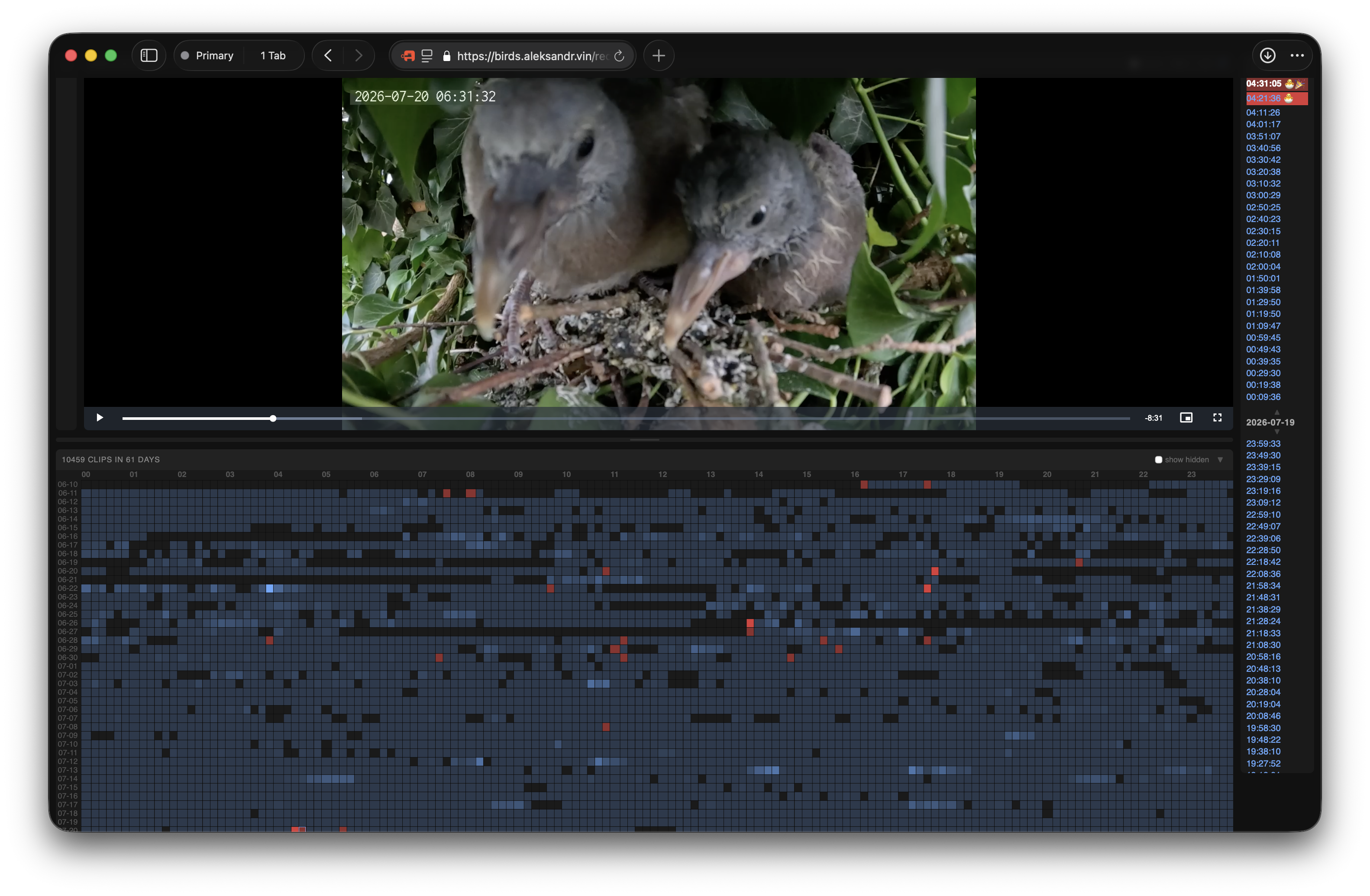
If you find a fun moment too – send the link to me – link has a timestamp, if you didn’t notice, so if you refresh/bookmark/share it, it will start playinf from the same moment ;)
Here is an example of the link: https://birds.aleksandr.vin/recordings?t=28#birds-2026-07-20_04-21-36.mp4 – the chicks are walking like on a broadway there.
Continuous fun
Maybe I forgot something while was I writing this long story here (it took me some evenings and attempts to go up to this point). I’ll update the story if I find out that what I forgot is worth being mentioned here, once I remember it. But here is one more thing that I decided to build for fun: a macos screensaver https://birds.aleksandr.vin/screensaver – another fun project, which ended up streaming my pigeon nest on a mac, when I was not around – that one for the lulz!
Learnings
- Pigeons wildlife, incubation periods eggs amount, pigeon milk, learning to fly, etc.
- gopro streaming stability
- Youtube broadcasting
- CarPlay, Android Auto
- And tons of OMC…
Future plans, once chicks are out of the nest maybe I’ll do them one day
I am thinkg of packaging a system as an ad-hoc live streaming with your gopro on labs: you install labs on your gopro, point it to one QR code, that teaches her the wifi, then to another QR code and you’re live, here and now.